
KeyCRM
KeyCRM integration with AdsQuiz
The KeyCRM integration with AdsQuiz sends quiz leads straight to the right CRM pipeline – no manual data entry and no delays. Setting it up takes a few minutes and needs no technical skills.
🔗 What KeyCRM is and why connect it
KeyCRM is a Ukrainian CRM system built for online stores, service businesses and sales teams. It lets you manage leads, deals, orders and client communication in one place. With AdsQuiz the KeyCRM integration works like this: a user takes the quiz and leaves their contact details – and at that very moment a new lead is created in your KeyCRM pipeline. The manager sees not only the name and phone number but also all the answers the potential client gave in the quiz. This lets them prepare a personal offer before the first call.
📋 What is sent from AdsQuiz to KeyCRM
After the quiz is completed, KeyCRM automatically receives:
- Contact name
- Phone number
- Email address
- All answers to the quiz questions
- Source ID (if set up)
Thanks to the quiz answers, the manager understands the client's need on the very first call and can offer exactly what fits.
⚙️ Step-by-step KeyCRM integration setup
⚙️ Step 1. Open the integration settings Go to the quiz you need in AdsQuiz. Open «Settings» → «Integrations» and find the integration in the list: KCRM.
⚙️ Step 2. Connect the API key To get the API key, go to your KeyCRM account and open «Settings» → «General». Find the API key field, copy its value, go back to AdsQuiz and paste the key into the integration field. 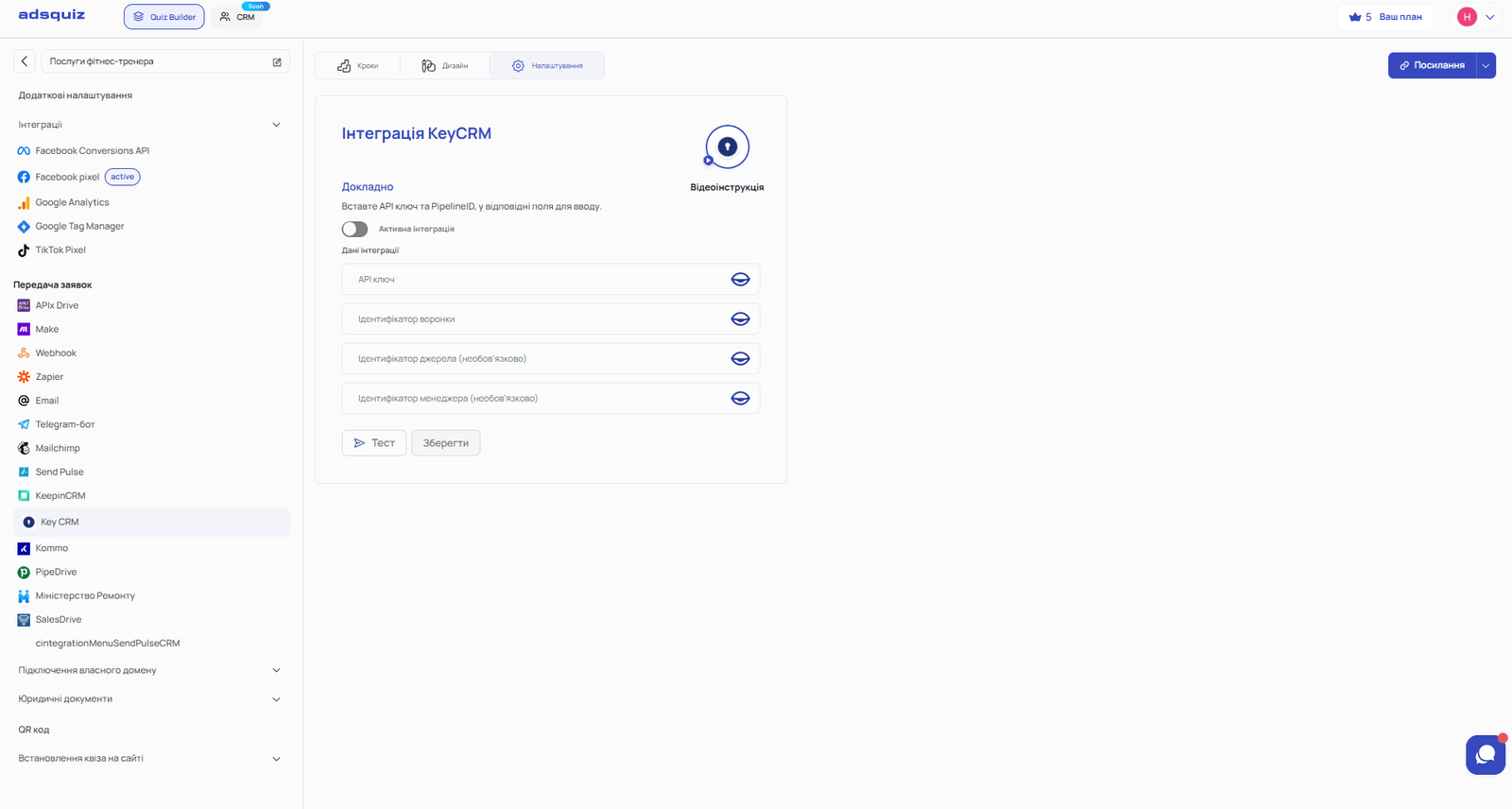
💡 Tip: Keep the API key in a safe place. If the key has been compromised, generate a new one in the KeyCRM settings.
⚙️ Step 3. Enter the pipeline ID Open the pipeline you need in KeyCRM. Each pipeline has its own numeric ID – for example: 1, 2, 3, 15 and so on. Copy the ID of the pipeline and paste it into the field in the AdsQuiz integration settings. Click «Save».
⚠️ Important: the API key and pipeline ID are required fields. The integration won't work without them.
⚙️ Step 4. Set the source ID (optional) If you need to track exactly which source a lead came from, add a source ID. In KeyCRM, go to the source settings and create a new source or choose an existing one – for example, «Quiz». Copy its numeric ID (for example, 1 or 147) and paste it into the «Source ID» field in AdsQuiz. Save the changes.
💡 Tip: If you run several quizzes for different products or audiences, create a separate source for each in KeyCRM – this makes analytics and lead distribution between managers easier.
⚙️ Step 5. Check that the integration works Make sure the integration is enabled (the toggle is on). Then open the quiz, complete it and fill in the contact details. If the thank-you page appears, the request has been sent. Go back to KeyCRM, open the pipeline and check that a new lead with the quiz answers has appeared.
The integration settings also have a «Test» button – it sends one of the last 10 leads already in the system to KeyCRM. Test sends via this button don't use up your lead balance.
🎥 Recommended video
A video guide to setting up the AdsQuiz and KeyCRM integration – step by step, with a real example of connecting a pipeline and checking lead transfer. Watch the video
❓ Frequently asked questions
What data is sent from AdsQuiz to KeyCRM? KeyCRM receives the contact's name, phone and email, plus all answers to the quiz questions. If a source ID is set up, it is also recorded in the lead card.
Where do I find the pipeline ID in KeyCRM? Open the pipeline in KeyCRM – its numeric ID is shown in the URL or in the pipeline settings. It can be any number, for example 1, 5 or 23.
What if the lead doesn't appear in KeyCRM after a test? Check that the API key and pipeline ID are entered correctly. Make sure the integration toggle is on and the changes are saved. If the problem persists, contact AdsQuiz support.
Can leads be sent to several KeyCRM pipelines at once? Currently one integration uses one pipeline. If you need to distribute leads, use separate quizzes for each pipeline or set up distribution inside KeyCRM with automation rules.
Do I need technical skills to set up the integration? No. You only need to copy the API key and pipeline ID from KeyCRM and paste them into the fields in AdsQuiz. The whole process takes 5-10 minutes.